
Automatic event boxes
Identify connected time-frequency features against a local spectrogram background and propose candidate regions.
Acoustic detection model trainer
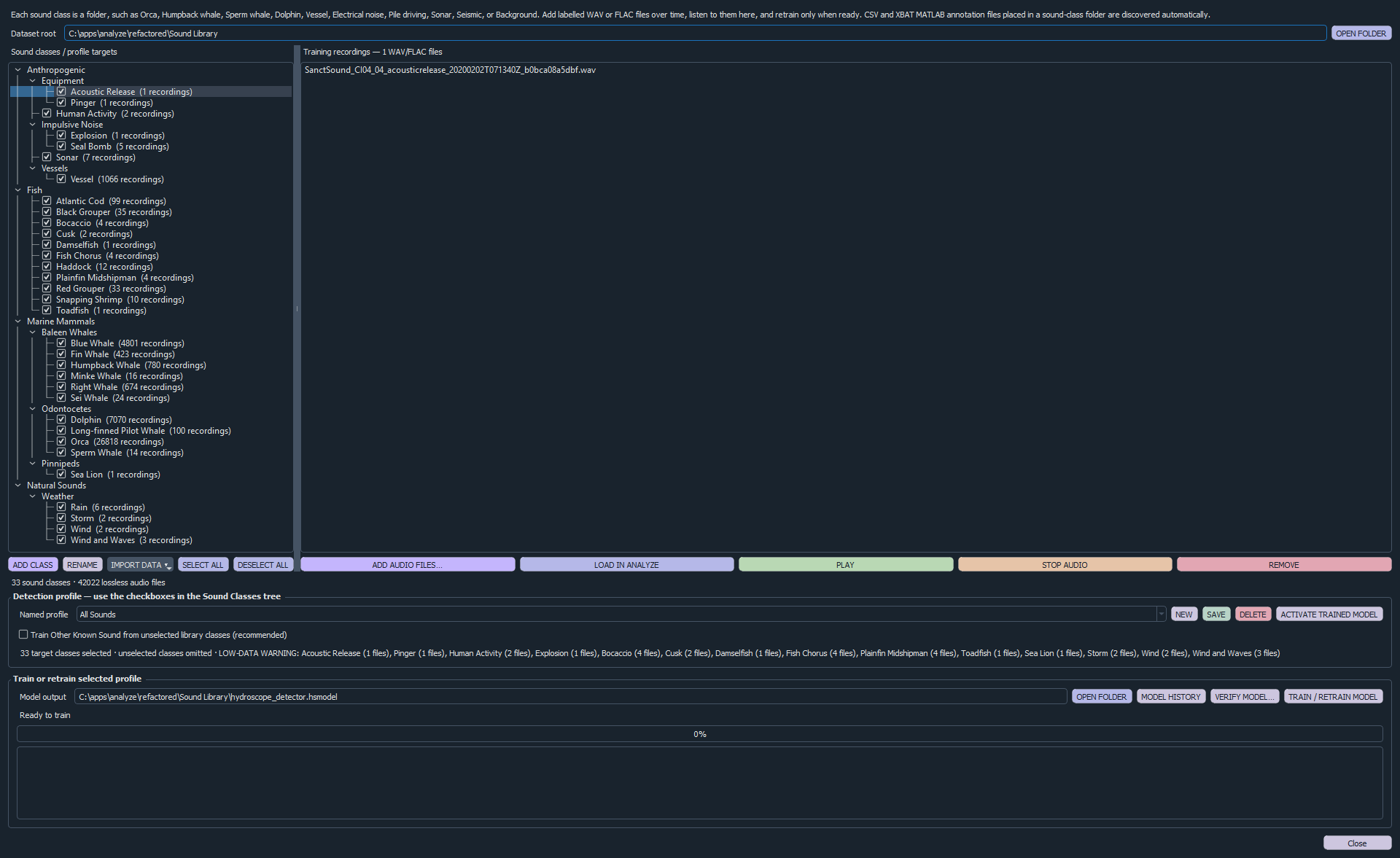
Build a labelled Sound Library from lossless recordings, train models around selected sound classes, verify predictions on independent files and use the active model to assist spectrogram annotation.
A complete learning loop
Acoustic classification depends on the recording environment, equipment, target classes and quality of the labelled examples. Analyze keeps these inputs visible so the model can be trained for the work at hand rather than treated as a generic black box.
Create nested sound classes and add labelled WAV or FLAC recordings. Analyze can discover compatible annotation ranges and lets analysts listen to training material or load WAV examples into the main workspace.
Train an All Sounds model or save profiles containing selected target classes. Unselected library classes can contribute an “Other Known Sound” class, helping distinguish targets from other recognised acoustic sources.
Test one recording or a batch and compare expected class, prediction, confidence, window agreement and the strongest alternative. Ambiguous and mismatched results are surfaced for review.
Model-assisted annotation
Identify connected time-frequency features against a local spectrogram background and propose candidate regions.
Apply the active model and display predicted class, confidence, window agreement and alternatives.
The analyst makes the authoritative decision and can replace a proposed class before it enters the record.
Accepted events can enter reviewed sound-class folders; rejected candidates can become Background examples.
Use project-specific call knowledge, the reusable global library or both when assisting annotation.
Retain the final class with the original model guess, confidence, source file, times and review timestamp.
Operational model management
Feature caching reuses unchanged material while new or changed recordings are extracted again for the next model.
The previous trained model is archived before retraining so an earlier version can be restored when required.
The library log records reviewed detections and supports moving a clip to the correct class, making corrections part of the next training cycle.
Important: model output is decision support. Classification quality depends on representative labelled data and should be verified against independent recordings from the intended operating conditions.
Workflow
| Stage | What Analyze does | Analyst control |
|---|---|---|
| Library | Organises lossless recordings and compatible labelled ranges by sound class. | Choose classes, inspect examples and correct labels. |
| Training | Extracts acoustic feature windows, trains a selected profile and reports held-out validation results. | Select targets and decide when a model is ready to activate. |
| Verification | Runs independent files and reports class, confidence, agreement and alternatives. | Investigate ambiguity and mismatches before operational use. |
| Annotation | Proposes event regions and classifications on the spectrogram. | Accept, relabel or reject every candidate. |
| Improvement | Returns reviewed positive and negative examples to the Sound Library. | Curate the library and retrain when evidence warrants it. |
Related applications
We can demonstrate the library, training, verification and reviewed-annotation loop using a workflow relevant to your project.